Add properties
Last updated: August 25, 2026
Add property information to Archipelago to maintain up-to-date Views.
Add a Single Property (Video)
On the SOVs page, click All Properties.
Click Manage Properties Button
Select + Add New Property
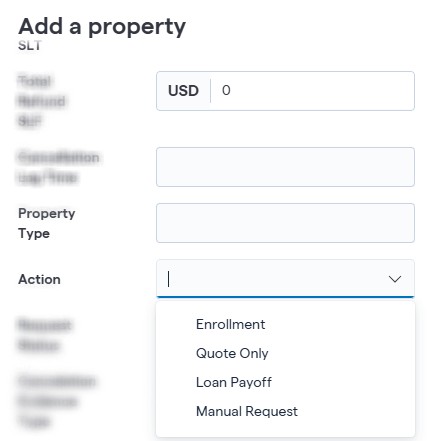
Use Flyout to Add Property-Related Information
Click Add Property to Save and Submit
Custom Dropdown selections
Dropdown selections can be configured for property fields upon request. When requesting a dropdown, provide the field name and the values you want available as selections.
Once configured, users can select from the predefined values when adding a property.
The available dropdown fields and values depend on the account configuration.
Tip: Address details and Total Insurable Value are Required Fields. Total Insured Value is calculated and requires values in other Value Fields. 0 is accepted.
Download your property spreadsheet
On the SOVs page, click All Properties.
Click Manage Properties Button.
Select Add Properties with Excel File.
An Excel spreadsheet will automatically download. Open it to see a blank sheet with column headers provided.
Update the spreadsheet
Add the property information directly into the spreadsheet by filling in the columns for the data that you have available. These properties can be edited later for additional data you may have. Some cells include drop-down lists for the COPE and secondary COPE attributes. You can also see the available options on the second page of the spreadsheet.
To add more than one property at a time, fill in one row for each property you wish to add.
Save the spreadsheet.
Upload your changes
Navigate back to Archipelago. If you've closed the Add Properties panel, open it again, but ignore any additional spreadsheet download.
In the Add properties panel, upload the spreadsheet you edited. You can drag the file into the box or click the box and select the file.
Click Add properties at the bottom. Archipelago will validate your data. If Archipelago cannot validate your data, you'll be provided a list of values to correct before re-uploading the updated spreadsheet.
When Archipelago validates your data, the platform will apply your changes. This can take up to 20 minutes.
Then, you can view information about the property you added using the sov, Dashboard, or Gallery views. Newly added properties will also appear in the Change Analysis under New properties.
After you add a property, you can upload documents related to it, such as Property Condition Assessments, Inspection Reports, and more.